Prove your new payroll pays the same as PeopleSoft.
Catch pay errors before cutover, not after.
ABCC Pay Check from ABCC compares PeopleSoft pay results with your new system's results, worker by worker and cheque by cheque. You get a plain-English report your payroll team can act on and your executives can sign off.
Pilots open in 2027 · Demos use made-up sample data, never real peopleThe problem
Moving off PeopleSoft is a big project, and payroll is where it hurts most.
Parallel runs are done by hand
Teams export two pay registers, line them up in spreadsheets and check a sample under deadline pressure.
Small errors hide in big numbers
A missing worker, a back-pay line or a flipped sign can sit inside totals that look fine.
Errors found after go-live cost more
They mean off-cycle cheques, grievances, tax corrections and lost trust, and by then the old system is gone.
Staying on PeopleSoft has the same risk
Every tax update and patch can change someone's pay, and most teams test only a handful of employees.
How it works
Three steps. Your data stays with you the whole time.
Export
Your team exports pay results from PeopleSoft and from the new system (or from a test system before and after an update). We give you the exact file layout.
Compare
ABCC Pay Check runs on your own computer or server. It matches every worker, pay period and pay code, ignores rounding you choose to accept, and sorts each difference by type.
Decide
Page 1 says red, amber or green. The pages after it show the detail behind every difference. The payroll lead fixes or accepts each item, then runs the check again.
What we offer
One engine, three ways to use it.
Exit pay check
For moves to Workday, Oracle Cloud HCM, Dayforce, UKG or another system.
- Compares PeopleSoft and the new system for every parallel run
- Lists old pay codes against new ones and flags any code with no match
- Sign-off summary for the steering committee and auditors
Update check
Checks each update before it goes live.
- Pay on a test system before and after a tax update, bundle or patch
- Shows who gets a different cheque, and by how much
- Traces each change to the setup change that caused it where it can, and flags anything it can't explain
Setup audit
A fixed-scope check of your Absence and Time & Labor setup against your written policies or agreements.
- Clause by clause: matches, does not match, or unclear
- Evidence from your setup and sample results
- Your HR team confirms every finding. This is a technical configuration check, not a financial audit.
See a sample report
Every report opens with a one-page summary for executives. The detail pages are written so a junior analyst can follow them.
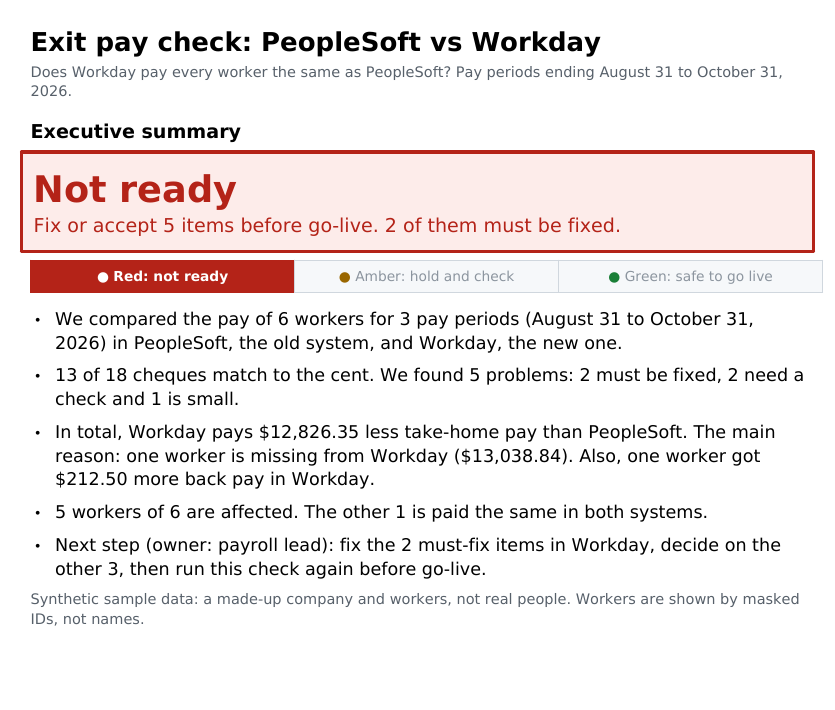
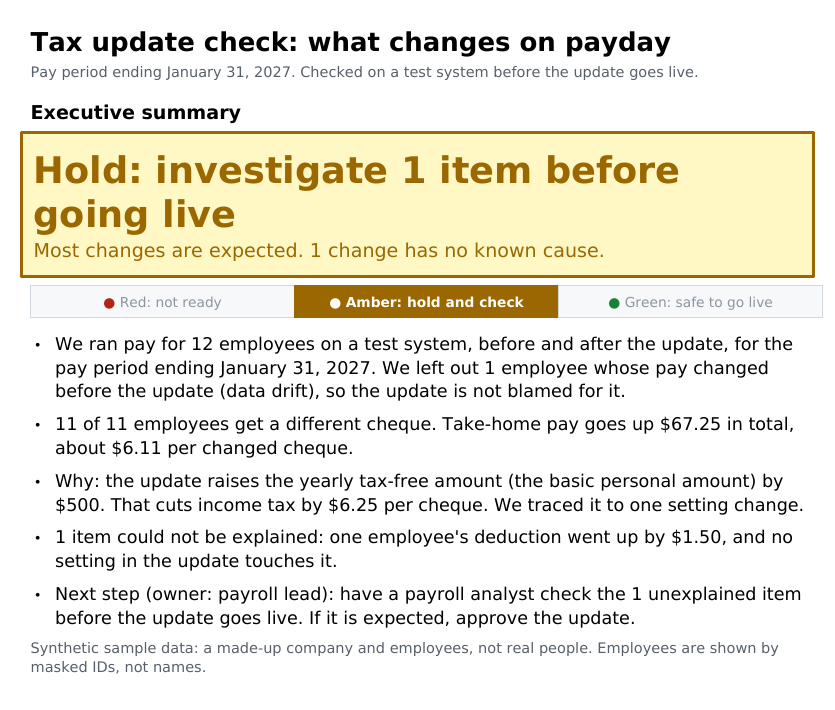
Synthetic sample data: both samples use a made-up company, workers and tax setup, not real people or real rates. Workers are shown by masked IDs.
Samples use synthetic data. ABCC Pay Check output is a review aid, not payroll, tax or legal advice; results depend on your data and configuration.
Security
Built for payroll teams who can't send data outside the building.
- Read-only. It reads pay results and setup. It never writes to your database.
- Runs in your environment. On your computer, server or virtual machine, and it works without an internet connection.
- No data leaves. Nothing is sent to ABCC or to any cloud service.
- No PeopleSoft changes. No new pages, records or code inside PeopleSoft.
- Masked by default. Reports show masked IDs, not names.
Works with
Here is what works today and what is still on the roadmap.
Available now Today
- PeopleSoft HCM pay results: Global Payroll, Payroll for North America, Absence Management, Time and Labor
- Generic file import: CSV or Excel pay register from any system, using a column map
Adapters on roadmap Roadmap
Until a direct adapter ships, use file import.
About ABCC
ABCC PeopleSoft Consulting Inc. is based in Ottawa, Canada. We specialize in PeopleSoft HCM and payroll: Global Payroll, Payroll for North America, Absence Management and Time and Labor. ABCC Pay Check grew out of hands-on PeopleSoft payroll work. We serve organizations in Canada and the United States.
Alagiri Ruban Selvaraj is a PeopleSoft HCM technical consultant based in Ottawa, working in PeopleTools and PeopleCode, Absence Management and Time & Labour. He is the director of ABCC PeopleSoft Consulting Inc., incorporated in 2016. Contact: info@abccconsulting.ca.
FAQ
Does this replace our implementation partner's testing?
No. It gives you an independent, client-side check of the results. It is designed to sit alongside your partner's own testing.
Does our data leave our network?
No. ABCC Pay Check runs inside your environment and sends nothing out.
Do we need to change PeopleSoft?
No. It only reads data.
Which payroll systems do you support?
PeopleSoft today, and any system that can export a pay register to CSV or Excel. Direct adapters for Workday, Oracle Cloud HCM, Dayforce, UKG and others are on the roadmap.
Is ABCC an Oracle partner?
No. ABCC is an independent consulting company. We are not affiliated with or endorsed by Oracle, Workday, Dayforce, UKG, ADP or SAP.
What does it cost?
We will share pricing with organizations on the pilot waitlist when pilots open in 2027.
When can we start?
Pilots open in 2027. Join the waitlist now and we will contact you. If your parallel runs or a major update are coming up, tell us the dates.
Can we see it first?
Yes. Book a demo. Demos use made-up sample data only.
Join the pilot waitlist
Pilots open in 2027. Tell us about your timeline and we'll be in touch, or ask for a demo.